Emotions
An 8-axis emotional core that changes as you talk.
Most conversational characters have one facial expression: pleasant. IAMX gives every character a living emotional core — a continuously updated model of how it feels, built from eight independent axes. The core listens to the whole conversation, shifts in real time, and then drives what you actually see and hear: the face, the tone of voice, and the body. Compliment the character and its eyes soften and its shoulders relax; insult it and you watch the warmth drain out of its expression while its voice cools. Nothing is scripted — the mood is derived from the dialogue as it happens.
This page explains the eight axes, how the emotional state evolves over time, how to read and steer it from Blueprint, and how to tune the dynamics per character in the panel.
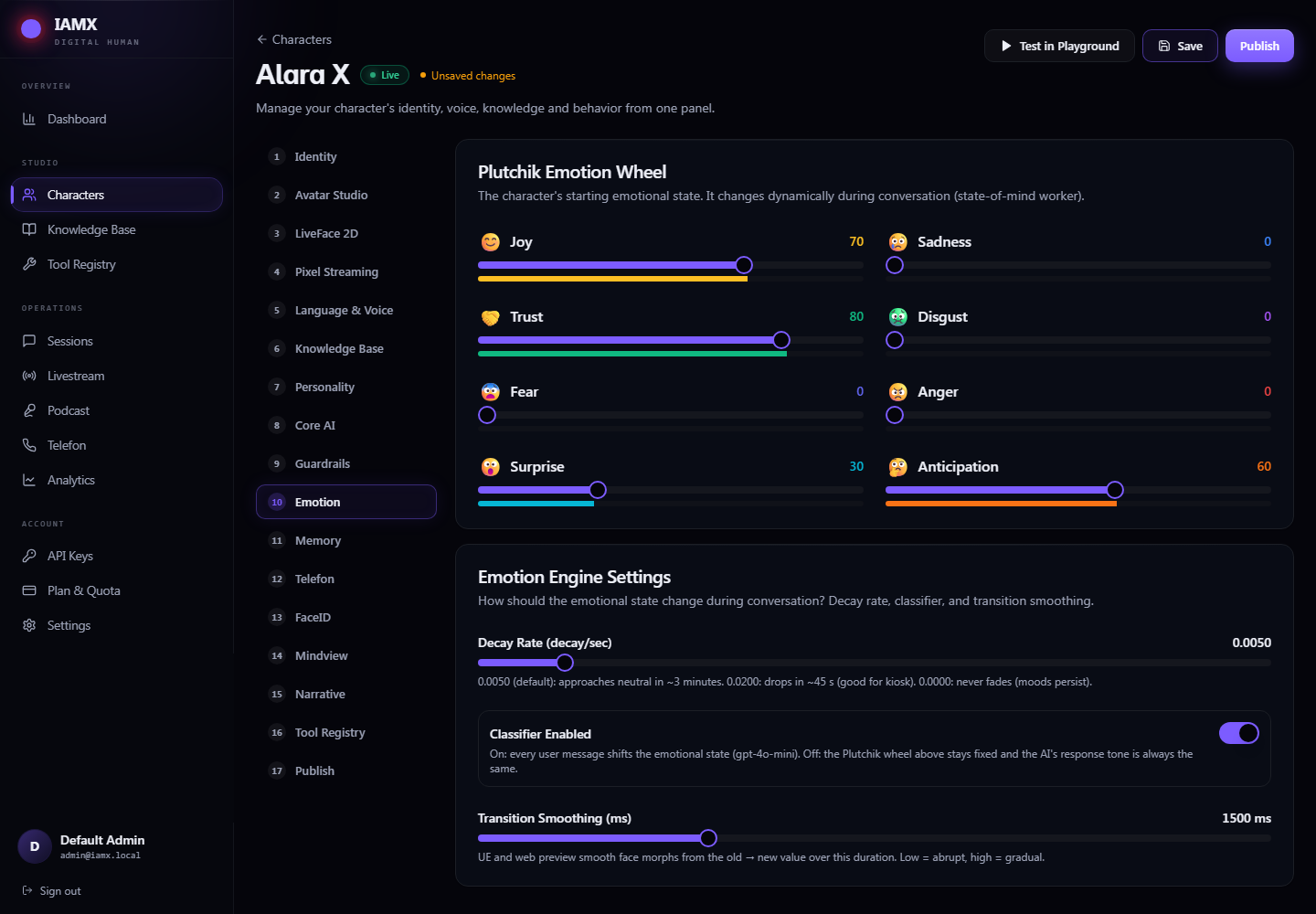
The eight axes
The emotional core is not a single "happy ↔ sad" slider. It tracks eight primary axes simultaneously, each with its own score. Any real emotional state is a blend across all eight — a character can be joyful and a little afraid, or trusting and surprised, at the same time.
Joy
Warmth, delight, contentment. Lifts the cheeks and mouth, brightens the voice, opens the posture.
Trust
Comfort and rapport with the person it is talking to. Drives leaning in, steady eye contact, an easy tone.
Fear
Wariness or threat. Widens the eyes, tightens the voice, pulls the body back and defensive.
Surprise
The reaction to the unexpected. Sharp brow raise, a quick intake, a jump in vocal pitch.
Sadness
Disappointment, loss, low energy. Drops the brow and gaze, slows and lowers the delivery.
Disgust
Distaste or rejection. Wrinkles the nose, curls the lip, adds a clipped edge to the voice.
Anger
Frustration and hostility. Furrows the brow, hardens the jaw, sharpens and pushes the voice.
Anticipation
Interest and forward-leaning attention. Keeps the character engaged, alert, expectant.
Each axis carries a normalized score. Reading one axis tells you a slice of the mood; reading several tells you the whole picture. The pairs are deliberately complementary — joy against sadness, trust against disgust, fear against anger, surprise against anticipation — so the blend can express nuanced, mixed feelings rather than flipping between a handful of fixed presets.
| Axis | Rises when the character… | Shows up as |
|---|---|---|
| Joy | is praised, succeeds, connects | smile, bright tone, open posture |
| Trust | feels safe and understood | leaning in, steady gaze, relaxed voice |
| Fear | senses threat or pressure | wide eyes, tight voice, guarded stance |
| Surprise | hits the unexpected | brow flash, pitch jump, quick gesture |
| Sadness | is let down or hears bad news | lowered gaze, slow soft delivery |
| Disgust | is offended or repelled | nose wrinkle, lip curl, clipped tone |
| Anger | is insulted or blocked | furrowed brow, hard jaw, sharp voice |
| Anticipation | is curious and engaged | alert eyes, forward lean, expectant beat |
How it behaves
The emotional core is a dynamic system, not a lookup table. Two forces act on it continuously.
It shifts with the conversation
Every turn of dialogue nudges the axes. The character weighs what was said, who said it, and its own personality, then pushes the relevant axes up or down. This happens live, mid-conversation — you do not need to script triggers or hand-author expression changes. The mood is an emergent read of the exchange so far.
It decays over time
Left alone, the state drifts back toward the character's baseline temperament. A spike of surprise fades within moments; a slow build of trust lingers far longer. This decay is what makes the character feel alive between beats — emotions cool naturally instead of freezing on the last thing that happened. The rate of that return is one of the things you tune per character (see below).
  score
   ▲
1.0│           ╭─ anger spikes on the insult
   │          ╱ ╲
   │         ╱   ╲___
   │        ╱        ╲______ decays back toward baseline
   │   ____╱                ╲__________
0.0│──────────────────────────────────────► time
        turn: "you're being rude"    (no new provocation)
Mood drives three channels at once
The current blend is not just a face parameter. It feeds three output channels simultaneously so the character reads as coherent from head to toe.
Face
Expression is driven straight from the axis blend and layered on top of live lip sync, so the character can frown while it speaks.
Voice
Tone, pace and energy of the spoken delivery bend with the mood — a sad line actually sounds sad.
Body
Idle and gesture selection shift with the state: engaged lean-ins, defensive pull-backs, low-energy slumps.
Control it from Blueprint
The emotional core is fully scriptable. You can read any axis, override the mood for a scene, and react the instant the state changes — all without touching C++. These nodes live under the IAMX | Emotions category on your character component. Full signatures are in the Blueprint API reference.
| Node | Type | What it does |
|---|---|---|
Get Emotion Score | Function | Reads the current normalized score of a single axis (e.g. how much Anger right now). Use it to gate dialogue, drive UI, or branch gameplay on mood. |
Set Mood | Function | Nudges the state toward a target blend and lets it evolve naturally from there. Ideal for scene setup — "start this character wary" — without freezing it. |
Force Set Emotion | Function | Hard-overrides one or more axes to exact values immediately, bypassing the usual smoothing. Use for scripted beats where you need a guaranteed expression on a specific line. |
Reset Emotion | Function | Clears the current state back to the character's baseline temperament. Good between scenes or when starting a fresh interaction. |
On Emotion State Changed | Event | Fires whenever the blend shifts meaningfully, handing you the updated axis scores. Wire it to gameplay, VFX, subtitles, analytics — anything that should react to how the character feels. |
A typical wiring
- Set the opening mood — call
Set MoodinBeginPlayto give the scene an emotional starting point (e.g. lean into Trust for a friendly greeter). - React to changes — bind
On Emotion State Changedand read the axes off the event payload instead of polling every frame. - Branch on a threshold — inside the event, use
Get Emotion Scoreon Anger or Fear; above a threshold, trigger a de-escalation line, swap a camera, or flag the session. - Punch a scripted beat — on a key story line,
Force Set Emotionfor a guaranteed reaction, then let decay carry it back. - Reset between scenes — call
Reset Emotionso the next interaction starts clean.
On Emotion State Changed over sampling Get Emotion Score every frame — you get the updated scores exactly when they matter and avoid redundant work on quiet frames.Set Mood when you want a nudge the core can still evolve, and save Force Set Emotion for scripted, one-off beats.Tuning per character
The emotional core is data-driven, so its dynamics are configured per character in the panel — no rebuild required. A stoic security guard and an excitable shop assistant can share the same eight axes but feel completely different.
- Decay rate — how quickly each axis returns to baseline. Slow decay makes a character that holds a grudge or stays warm; fast decay makes one that shrugs everything off and resets to neutral.
- Reactivity / dynamics — how strongly the conversation moves the axes. Turn it up for an expressive, mercurial personality; turn it down for a calm, hard-to-rattle one.
- Baseline temperament — the resting blend the state decays toward, so a character can idle cheerful, guarded, or reserved by default.
Because these values live in the character config, you can tune the feel of a character, hit save, and see the change on the next interaction — the same config drives the live experience and any Blueprint logic reading the axes.
Where to go next
Blueprint API
Full signatures for every emotion node and event. Open the reference →
Quickstart
Get a talking, feeling character running in minutes. Start here →
Install
Add IAMX to your project and grab the latest build. Install guide → · Releases