Knowledge & memory
Answers grounded in your content — and a character that remembers you tomorrow.
Out of the box, a language model answers from what it learned during training. That's fine for chit-chat, but a kiosk or assistant that represents your business needs to speak from your facts — this year's pricing, your return policy, the room number for Tuesday's workshop. IAMX gives your character two complementary abilities: a knowledge base so it answers from documents you provide, and long-term memory so it recognizes returning visitors and picks up where the last conversation left off.
Knowledge base
Upload your documents. The character retrieves the relevant passages and grounds its reply in them — no guessing, no hallucinated policies.
Long-term memory
Each session is summarized and stored. Returning visitors get a warm "welcome back" that references what they last asked.
Face recognition
On kiosks, the character recognizes returning people by face and greets them by name — no login, no QR code.
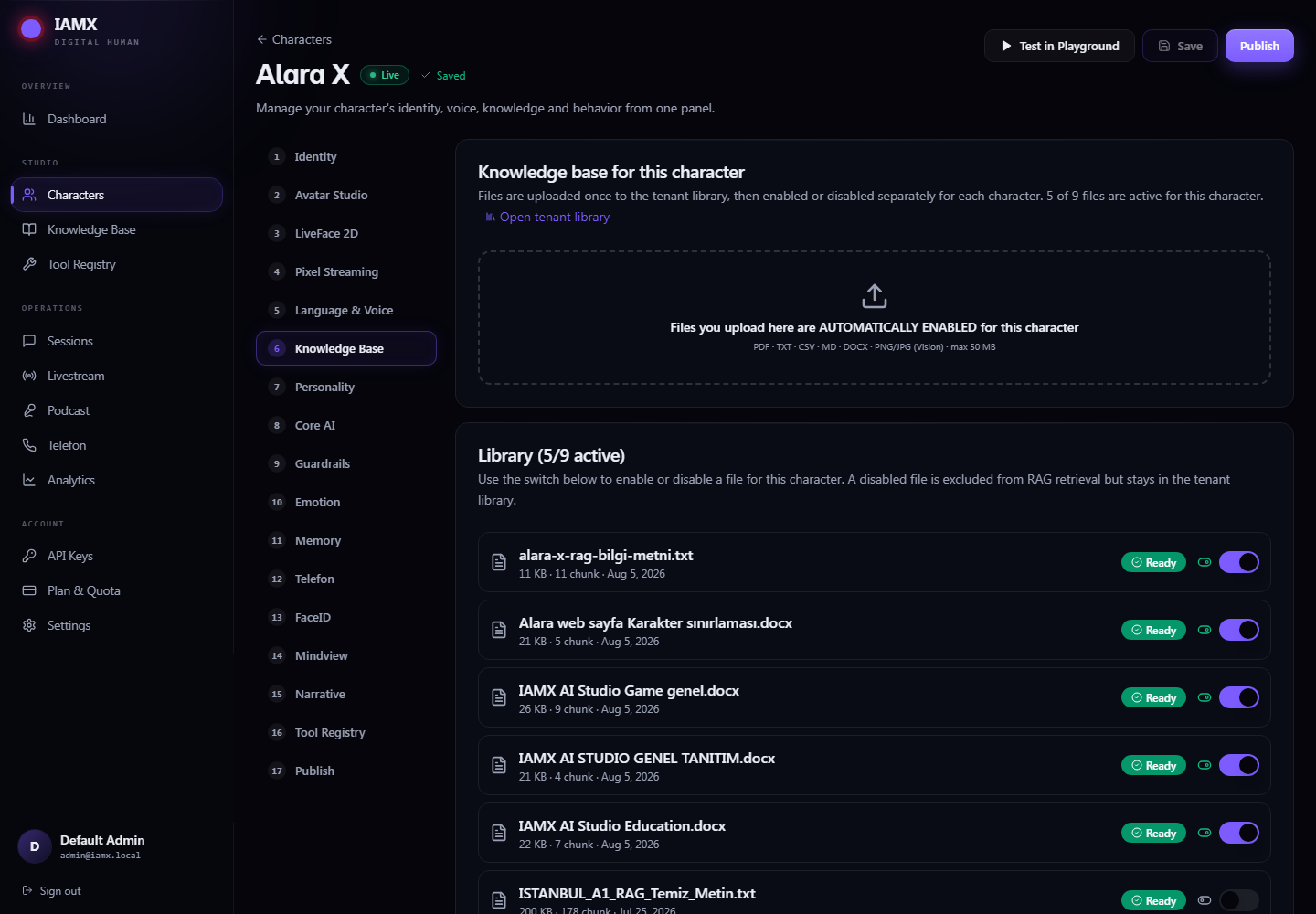
Knowledge base (RAG)
The knowledge base is retrieval-augmented generation done for you. You upload files; IAMX indexes them; and on every question the character quietly looks through your content, pulls the most relevant passages, and hands them to the language model as trusted context before it writes a word. The answer that comes back is phrased naturally by the model but sourced from you.
Ask something covered by your documents — "What's the cancellation window on the premium plan?" — and you get your answer, in your character's voice, not a plausible-sounding invention. Ask something your documents don't cover, and the character can fall back to normal conversation or politely say it doesn't have that on file (your choice, configured in the character's prompt).
What you can upload
Files are managed per account from the panel and then toggled on per character. Supported formats:
| Type | Examples | Good for |
|---|---|---|
| Brochures, manuals, contracts, menus, spec sheets | Long-form reference material and official documents | |
| TXT | FAQs, policies, notes, transcripts | Plain, fast-changing text you edit often |
| CSV | Price lists, product catalogs, schedules, directories | Structured rows the character can look items up in |
| Images | JPG, PNG, WebP — screenshots, posters, labeled diagrams, photographed signage | Content that only exists as a picture; the text and meaning are read and indexed for you |
How grounding works
You don't wire any of this together — it happens on every turn. At a high level:
- Ingest — When you upload a file, IAMX breaks it into passages and indexes them so they can be searched by meaning, not just by exact keywords. This happens once, in the background.
- Retrieve — When the visitor asks something, IAMX searches your indexed content for the passages most relevant to that specific question and keeps the strongest matches.
- Inject — Those passages are attached to the request as reference material the model is told to trust and prefer.
- Answer — The language model composes a natural reply grounded in that material, in your character's tone, and speaks it with lip sync like any other line.
Visitor: "Do you ship to Germany, and how long does it take?"

        │
        ▼
  ┌───────────────┐     search your files by meaning
  │  Retrieve     │────────────────────────────────────►  shipping_policy.pdf  (matched passages)
  └───────────────┘                                        rates_2026.csv       (matched rows)
        │
        ▼  relevant passages attached as trusted context
  ┌───────────────┐
  │  Language      │   "Yes — we ship to Germany. Standard delivery
  │  model         │    is 3–5 business days at €6.90, free over €80."
  └───────────────┘
        │
        ▼
   Spoken by the character, grounded in YOUR documents
The retrieval step is tunable. Each character exposes how many passages to pull and how close a match has to be before it counts, so you can trade breadth (pull more, catch edge questions) against precision (pull only near-exact matches, stay tightly on-script).
| Setting | What it controls | Typical use |
|---|---|---|
| Enable knowledge base | Turns grounding on for this character | On for support/info kiosks; off for pure entertainment characters |
| Top passages | How many matching passages to inject per question | Higher for broad manuals, lower for short FAQs |
| Minimum match | How relevant a passage must be to be used | Raise it to avoid loosely-related tangents; lower it to catch paraphrased questions |
Per-character knowledge
Your files live once at the account level, but visibility is decided per character. A lobby concierge and a technical-support agent can draw from the same library or from completely different subsets — you simply toggle which files each character is allowed to see.
Common patterns:
- Shared core, private extras — every character sees the company FAQ, but only the HR character sees the employee handbook.
- Per-location — the same character deployed at three sites, each toggled to its own store's hours and stock sheet.
- Seasonal — enable the holiday-hours document in December, disable it in January, without deleting anything.
Long-term memory
A stateless character forgets you the moment you walk away. IAMX gives yours continuity across days. At the end of a session, the character summarizes what happened — who the visitor was, what they wanted, what was resolved — and stores that summary. When the same person comes back, the summary is loaded as context so the character can greet them with real recall instead of a cold open.
Day 1  ──►  "Hi, do you have the Pro plan monthly or only yearly?"
            … conversation …
            ⤷ session summarized:  "Asked about Pro plan billing options;
                                     interested in monthly; didn't purchase."

Day 3  ──►  Character (on recognizing the returning visitor):
            "Welcome back! Last time you asked about Pro pricing —
             we do have a monthly option now if you'd like the details."
What memory does
- Summarize each session — instead of storing raw transcripts, IAMX distills the conversation into a compact, useful summary so recall stays fast and relevant over time.
- Recognize returning visitors — a returning person's history is loaded before the greeting, so the very first line can reference the past.
- Carry context forward — unresolved questions, stated preferences, and where you left off travel with the visitor into the next visit.
- Stay reviewable — summaries and history are visible in the panel reports, so you can see what people are actually asking about across days.
Tuning recall
You decide how long a visitor is considered "returning" and how much history informs the greeting. A short window keeps a busy kiosk feeling fresh for walk-up strangers; a long window is ideal for repeat customers and regulars. The greeting itself is an operator-editable prompt, so "Welcome back!" can be as brief or as detailed as your brand wants — reference the last topic, or simply acknowledge the return.
Face recognition (paid)
On staffed and unstaffed kiosks, memory is even more powerful when the character can recognize a returning person on sight. Face recognition ties a returning face to that person's stored history, so the character can greet them by name and continue the relationship the moment they step up — no login, no card, no typing.
Person steps in front of the kiosk
        │
        ▼
  recognized as a returning visitor  ──►  load their summary + name
        │
        ▼
  "Welcome back, Deniz! Did the setup guide I sent you work out?"
How it behaves
- Greet by name — a recognized returning person is welcomed personally, drawing on their stored summary.
- Sticky during a conversation — once a person is engaged, the character stays locked onto them and won't switch mid-sentence to someone passing behind.
- Graceful for strangers — a first-time or unrecognized face gets a friendly generic greeting, and can become a remembered visitor for next time.
- Time-boxed sessions — a recently-verified person who steps away and returns within a configurable window is welcomed back as the same session rather than re-greeted from scratch.
Putting it together
A well-configured info kiosk uses all three at once: face recognition identifies the returning visitor, long-term memory reminds the character what that visitor cared about, and the knowledge base supplies the correct current answer to whatever they ask next. The result feels less like a chatbot and more like a colleague who remembers you and actually knows the material.
Set up knowledge
Upload your PDFs, TXT, CSV, and images in the panel, then toggle the files each character can see. See Quickstart.
Enable memory
Turn on long-term memory and set your returning-visitor window, then customize the welcome-back prompt.
Wire it in
Hook greetings and recognition events into your scene with the Blueprint API.
Ready to try it live? Spin up a character and upload your first document in the panel, browse the source on GitHub, grab a build from releases, or ask the community on the forum.