AI models
Pick the brain that powers each character — swappable any time, per character.
Every IAMX character is driven by a language model — the "brain" that decides what it says, how it reasons, which tools it fires, and how it stays in character. IAMX doesn't lock you into a single brain. You choose one per character in The Panel, and you can change it later without redeploying anything. Different characters in the same project can run entirely different models: a fast, chatty greeter out front and a careful, tool-driven agent at the desk behind it.
This page covers which brains are supported, the difference between realtime and standard conversation modes, and how to swap models on a live project. If you're just getting started, wire up a character first in the Quickstart, then come back here to tune the brain.
Supported brains
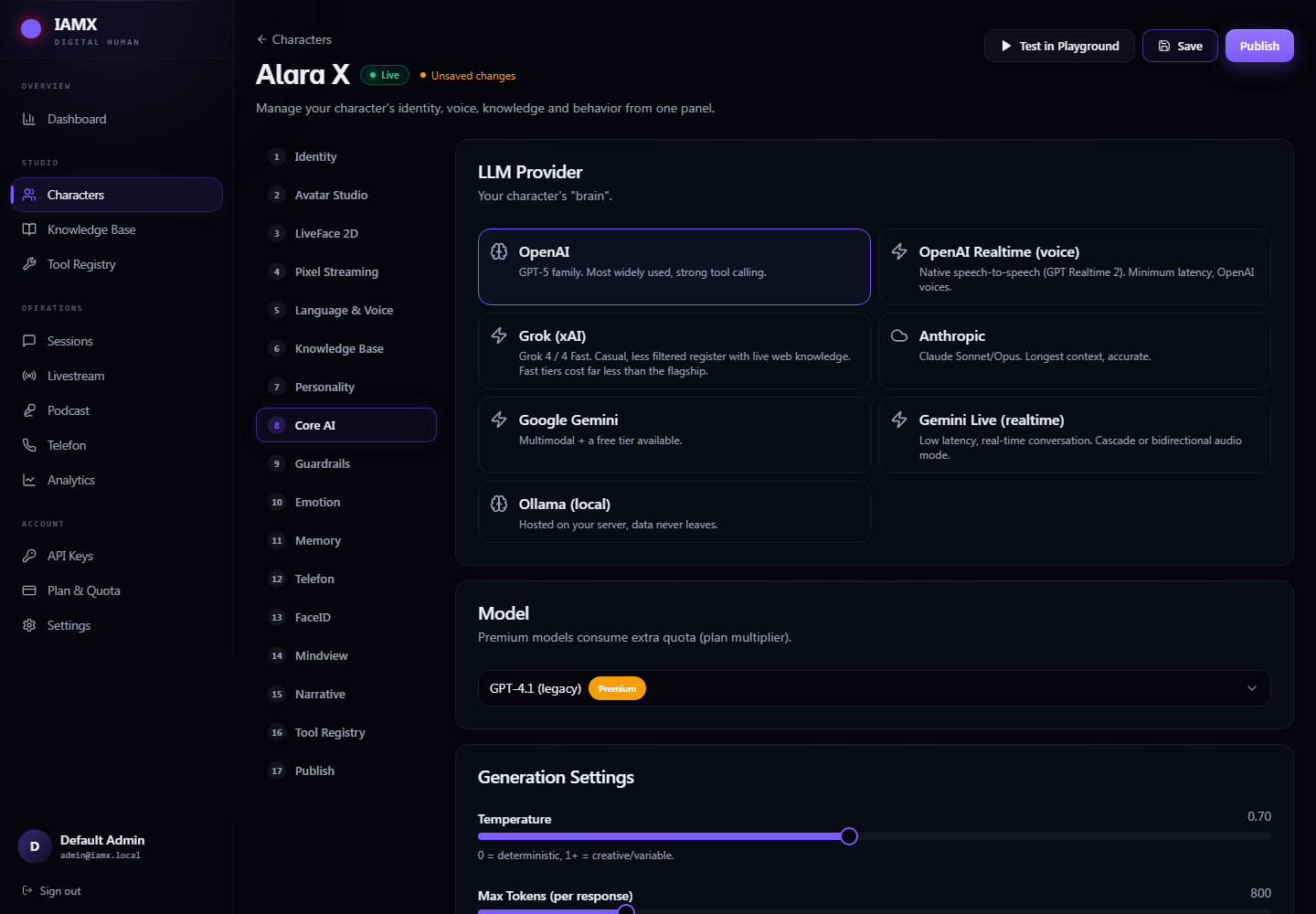
You set a character's brain in the Core AI tab of the character editor. Pick a provider, pick a model from that provider's list, and save. IAMX handles streaming, tool calling, and multimodal input uniformly across all of them, so the rest of your setup — voice, animation, actions, knowledge — is identical no matter which brain you choose.
GPT
Broad, dependable general-purpose reasoning with excellent tool-calling and vision. A safe default when you want something that "just works" across almost any use case.
Claude
Strong at nuanced instruction-following, long context, and staying tightly in character over long conversations. A great pick for detailed personas and structured agent flows.
Gemini
Fast, capable multimodal reasoning — and the only family that also offers Gemini Live, a native realtime voice mode for the lowest-latency spoken conversation.
Ollama (local)
Runs a model on your own hardware. Nothing leaves the machine — the strongest choice when privacy or offline operation matters. Quality and speed depend on the model and box you run it on.
Choosing between them
| Brain | Best for | Trade-off in one line |
|---|---|---|
| GPT | General assistants, broad tasks, iteration | Highest all-round quality and reliability, billed per use. |
| Claude | Long personas, careful agents, complex instructions | Excellent adherence and long context, billed per use. |
| Gemini | Fast multimodal, and native realtime voice via Gemini Live | Great speed and the only native realtime option, billed per use. |
| Ollama (local) | Private, offline, on-prem deployments | Fully private and no per-request cost — quality/latency scale with your own hardware. |
What every brain gets for free
Regardless of which brain you pick, IAMX layers the same capabilities on top:
- Token streaming — replies begin speaking as the first words arrive, not after the full answer is generated.
- Tool / action calling — the character can trigger the actions and external APIs you define. See Actions.
- Vision — send what the character "sees" (camera, render target, player view) to the brain as an image.
- Knowledge grounding — relevant snippets from your Knowledge Bank are injected before each reply. See Knowledge Bank.
Realtime vs standard mode
Beyond which brain, there's how the brain talks. IAMX supports two conversation modes, and the choice shapes latency, voice, and flexibility.
Standard mode asks the brain for text, streams that text back sentence by sentence, and feeds it into whichever IAMX voice you've assigned to the character. The brain and the voice are decoupled — you can pair any model with any voice.
Realtime mode lets the model speak directly: audio in, audio out, natively. There's no separate text-to-voice hop, which makes it the smoothest and fastest option for live spoken conversation — but the character speaks with one of that model's built-in voices, and realtime is only available on models that natively support it (today, Gemini Live).
| Realtime mode | Standard mode | |
|---|---|---|
| How it talks | Native voice — the model speaks audio directly | Streamed text replies fed to any IAMX voice |
| Latency | Lowest — single native audio hop | Low — streamed, but with a text→voice step |
| Voice choice | Locked to that model's built-in voices | Any IAMX voice you assign to the character |
| Model support | Only realtime-capable models (Gemini Live) | Works with every supported brain |
| Best when | Live, face-to-face, barge-in conversation where smoothness wins | You want a specific voice, or a brain without a realtime mode |
When to pick which
Pick realtime when…
The character stands in front of real people and the feel of a natural, interruptible spoken conversation matters most — a kiosk greeter, a live demo, an interactive booth. You accept the model's native voices in exchange for the tightest possible latency.
Pick standard when…
You need a very specific voice, want to keep the same voice while swapping brains, are running a private local model, or your chosen brain simply doesn't offer a realtime mode. Standard works everywhere and keeps voice fully in your control.
Swapping models
The brain is a Panel setting, not a compiled part of your Unreal project. That means you can change a character's model whenever you like — no rebuild, no repackage, no touching your Unreal project at all.
- Open the character — in The Panel, go to the character and open the Core AI tab.
- Pick a provider and model — choose the brain, then the specific model from its list. Optionally switch the conversation mode to realtime if the model supports it.
- Save — the new configuration is stored against that character.
- Next session applies it — the running character picks up the change on its next session. Finish the current conversation and the following one runs on the new brain.
Panel (Core AI tab)  ──save──▶  character config
                                     │
   ┌─────────────────────────────────┘
   ▼
next session ──▶ character starts on the new brain
(no Unreal rebuild, no redeploy)Next steps
- Quickstart — wire up your first character end to end.
- Voices — assign and tune the voice used in standard mode.
- Actions — give your brain tools to call.
- Knowledge Bank — ground replies in your own content.
- Try any brain live on the demo & panel, or ask the community on the forum.