IAMX Documentation
Build real-time, voice-conversational AI digital humans — in Unreal Engine and on the web.

See, talk & remember — embed on your site, kiosk or live stream.
Introduction
IAMX turns any character — a MetaHuman or your own custom rig — into a living, thinking digital human. It hears you, holds eye contact, answers in real time with perfectly synced lips, remembers you across sessions, and can take actions in your world. Instead of scripted dialogue trees, you get an actual conversation: the character listens while you speak, thinks with the language model you chose, and speaks back in a natural voice with facial performance to match.
The workflow is deliberately simple. You design a character once in the web panel — its personality, voice, AI model, knowledge and scenarios — then drop the IAMX plugin into Unreal (or paste a one-line embed on the web) and start talking. There is no pipeline to wire together, no models to host, and no ML plumbing to maintain in your project.
Everything is configured live from the web. Change a character's personality, swap its voice, raise its knowledge cutoff, add a new scenario or grant a new action — and the running character applies it on its next session. No rebuilds, no redeploys, no reshipping your game.
How IAMX fits together
IAMX is three cooperating layers. You mostly work in the first one; the other two do the heavy lifting so your project stays lean.
The panel
A web studio at iamx.live where you create and configure characters: set personality and voice, choose the AI model, upload knowledge documents, design conversation scenarios, and watch live analytics. This is your control plane — every adjustable setting lives here.
The cloud
Runs the heavy AI — understanding speech, reasoning, generating voice and driving the facial performance — and streams the character's performance back into your app in real time. It scales for you, so a single kiosk and a thousand concurrent players use the same simple client.
The client
A lightweight plugin for Unreal or a one-line web embed. It captures the microphone, renders the character, and connects to the cloud — nothing more. Your project stays small and ships fast because none of the AI runs inside it.
The round trip, end to end
Here is what happens between a person speaking and the character answering — typically in a fraction of a second:
  ┌────────────┐   voice    ┌───────────┐   understand   ┌────────────┐
  │  Person    │ ─────────► │  Client   │ ─────────────► │   Cloud    │
  │  speaks    │            │ (mic in)  │                │  (thinks)  │
  └────────────┘            └───────────┘                └─────┬──────┘
                                                               │
       lips + voice + eye contact + facial performance         │
  ┌────────────┐            ┌───────────┐   stream back        │
  │  Person    │ ◄───────── │  Client   │ ◄────────────────────┘
  │  hears &   │            │ (renders) │
  │  sees      │            └───────────┘
  └────────────┘
Because the intelligence is delivered at runtime, the same character can appear inside an Unreal build, on a website, and on a kiosk — all reading from one configuration in the panel.
What you can build
IAMX is a general-purpose engine for interactive digital humans. A few of the things teams build with it:
- Game & world NPCs — characters that actually converse with players instead of cycling through canned lines, and that can react and take actions in the game world.
- 24/7 interactive kiosks & receptionists — always-on digital humans that greet visitors, answer questions, and recognise returning guests.
- Virtual assistants & brand characters — a face and voice for your product or company that can answer, guide, and perform tasks on request.
- AI live-stream hosts & podcast duos — autonomous presenters, or two characters that talk to each other and to the audience in real time.
- Museum / showroom / training guides — knowledgeable hosts that walk people through an exhibit, a product line, or a lesson at their own pace.
What each build shares
| Capability | What it means for your build |
|---|---|
| Real-time voice conversation | People speak naturally; the character listens, thinks, and replies out loud — no push-button menus required. |
| Synced lips & facial performance | Mouth shapes and expression track the spoken audio so the character never looks dubbed. |
| Eye contact & presence | The character holds your gaze while you talk, which is what makes it feel alive rather than idle. |
| Memory across sessions | Returning users can be recognised and greeted with context from previous conversations. |
| Actions in your world | The character can trigger events and call your services when the conversation calls for it. |
| Knowledge grounding | Upload your documents and the character answers from them, not just from general knowledge. |
Spotlight: Teacher Mode
NewSometimes talking isn't enough. Turn on Teacher Mode and your character gets a real classroom board it writes on while it speaks — formulas, notes and multiple-choice quizzes appear in chalk, in real time, as the lesson unfolds. When words alone won't land a concept, the character shows it.
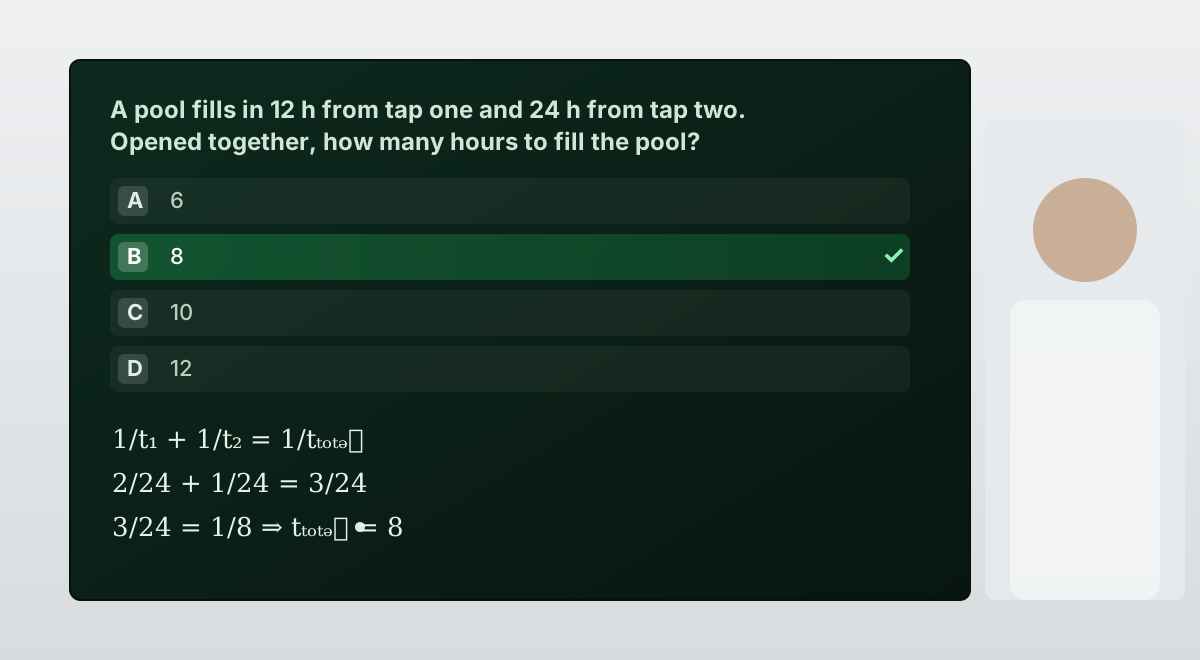
Writes as it explains
The moment the character mentions a formula or a step, it writes it on the board — typeset cleanly and drawn on like chalk — instead of only saying it out loud.
Interactive quizzes
It can pose a multiple-choice question, wait for the student to try, then light up the correct option with a check — never spoiling the answer before they've had a go.
Any subject, your teacher
The board is driven by the same character you design in the panel. Make it a patient tutor or a strict professor — the voice, the pace and the teaching style are yours.
Choosing your AI model
You pick which language model powers each character in the panel. IAMX supports the leading providers, so you can trade off quality, speed, cost, and privacy per character.
| Model | Good for |
|---|---|
| GPT | Broad general capability and strong tool use for action-driven characters. |
| Claude | Long, nuanced conversations and careful instruction-following. |
| Gemini | Multimodal reasoning and fast, cost-effective responses. |
| Ollama | Running a local model on your own hardware when data must stay on-premises. |
Design once, apply everywhere
The single most important idea in IAMX is that configuration is live. You never bake a character's brain into a build. Instead:
- Create the character in the panel — give it a name, personality, voice and model.
- Add knowledge and scenarios — upload documents it should know, and design the conversation flows it should follow.
- Grant it actions — define what it is allowed to do in your world.
- Connect a client — drop the plugin into Unreal or embed it on the web, pointed at that character.
- Iterate freely — edit anything in the panel; the character picks up changes on its next session automatically.
Start here
Ready to build? Begin with the Quickstart to get a talking character running in minutes, read How it works for a deeper tour of the panel–cloud–client architecture, and follow the Unreal plugin install guide to add IAMX to your project. From there, the Blueprint API reference covers wiring the character into your game logic.
Quickstart
Go from a fresh account to a character that talks back. Open the Quickstart →
How it works
Understand the panel, the cloud and the client in depth. Read How it works →
Install for Unreal
Add the plugin and connect it to your character. Open the install guide →
More resources
- Try a live character and manage your account in the web panel.
- Get the plugin and browse code on GitHub, or grab a build from Releases.
- Skip the wiring — download the ready-made Unreal Engine 5.3 sample project (2.1 GB), with the component, the AnimGraph nodes and a MetaHuman already set up. Paste your connection ID and press Play.
- Ask questions and share builds on the community forum, and follow updates on the blog.